Mailbox Team 持久团队
Mailbox team 适合“任务要留在团队里、直到完成才结束”的场景。lead 把任务投递到成员的 inbox;成员领取消息、执行工作,再把最终结果或阶段性进展回复给 lead。任务状态会一直留在 mailbox 里——可被领取、回复、跟进——直到标记完成。
Team 不是一个全新的 agent 概念——它仍然是一个 AgentLike(符合 agent 的 prompt() / query() 接口)。调用 Team 等于和 lead agent 对话;lead 背后有成员工具和 mailbox runtime,负责保存消息状态并继续驱动已接收的 handoff。
创建一个团队
Section titled “创建一个团队”当你想直接和 lead 对话,而让它在背后把任务分派给几个有名字的成员(例如 researcher、reviewer)去完成时,使用 createTeam()。
import {  createAgent,  createMemoryMailbox,  createTeam,  teamMember,} from "agent-lattice";
const researcher = createAgent({  apiKey: process.env.DEEPSEEK_API_KEY,  baseURL: "https://api.deepseek.com/anthropic",  model: "deepseek-v4-flash",  systemPrompt: "你负责调研 agent SDK 架构,并输出简洁结论。",  workspace: ".agent-workspaces/researcher",});
const team = createTeam({  name: "engineering",  lead: createAgent({    apiKey: process.env.DEEPSEEK_API_KEY,    baseURL: "https://api.deepseek.com/anthropic",    model: "deepseek-v4-flash",    systemPrompt: "你是工程负责人。需要调研时委托 researcher。",    workspace: ".agent-workspaces/engineering-lead",  }),  members: [    teamMember({      name: "researcher",      role: "executor",      focus: "Research agent architecture",      agent: researcher,    }),  ],  mailbox: createMemoryMailbox(),});
const result = await team.prompt("请让 researcher 检查 SDK 设计。");console.log(result.result);
team.query() 对团队 lead 发起对话,同时输出 lead agent 的普通 SDK 消息和 team_message、team_agent、嵌套 agent_message 等团队 runtime 事件;team.prompt() 则消费这个流,只返回 root lead 的最终结果。
调用成员的几种模式
Section titled “调用成员的几种模式”createTeam() 会把每个成员包装成一个工具注入 lead,所以 lead 调用成员就像调用工具,并要为每次调用指定一个明确的模式:
| 模式 | 含义 |
|---|---|
ask |
询问该成员,并在当前工具调用里等待最终答案。 |
handoff |
把任务交给该成员,并把接收回执作为工具结果返回。在 team.query() 或 team.prompt() 中,runtime 会继续推进已接收的 mailbox 任务,等待成员向上级回复,唤醒 lead,最终返回 root lead 的最终结果。 |
observe |
在宿主 runtime 支持时,启动可观察的长任务。 |
handoff 的接收回执不是最终交付,只表示工作已经进入 mailbox。为了兼容旧代码,回执继续保留 status: "accepted";同时增加 phase: "queued" 和 completion_pending: true,明确表示成员尚未完成。回执还包含 message_id、work_item_id 和 thread_id。
Lead 把当前这批 handoff 全部放入 mailbox 后,SDK 不会继续调用 Lead 模型。TeamRunner 会先执行这些成员;所有成员完成或失败后,SDK 再把报告交给 Lead,并继续调用 Lead 模型。因此,handoff 尚未完成时,Lead 不会进入下一次模型调用并轮询依赖结果的工具。
受控 handoff 并发
Section titled “受控 handoff 并发”handoff 工作默认串行执行。如果多个独立成员可以同时工作,通过 runner.maxConcurrentWorkItems 设置并发上限:
const team = createTeam({ name: "research", lead, members, runner: { maxConcurrentWorkItems: 4 },});高级调用方也可以直接向 createTeamRunner() 传入同名参数。该值必须是正整数,默认值为 1。
并发上限作用于不同的成员 mailbox。发给同一个 mailbox 的多个工作项仍然串行执行,因为 Agent 可能保留可变的对话状态。runtime 事件按照实际启动和完成顺序输出;交给 lead 的 mailbox 报告仍按原 handoff 顺序排列,并保留各自的消息、thread 和工作项标识。
Handoff 失败隔离
Section titled “Handoff 失败隔离”默认情况下,每个已接收的 handoff 都是相互隔离的工作项。如果某个成员返回 MaxTurnsError、APIError 等 Agent 错误,runtime 会:
- 把该成员的工作项标记为
failed; - 输出一条
subtype: "failed"的team_message事件,并附带归一化错误; - 向 lead 发送失败报告,同时把错误写入
message.metadata; - 继续执行其它已接收的 handoff;
- 把成功和失败报告一起交给 lead。
随后由 lead 决定重试、修改任务、接受部分结果还是直接结束。单个成员工作项失败不会直接导致 team.prompt() reject。
全局中止采用不同语义:AbortError 会终止 runner。向调用方抛出中止错误前,runtime 会把当前和剩余的已接收工作标记为 cancelled,避免工作项静默残留在 pending 状态。
成员 mailbox tools
Section titled “成员 mailbox tools”能够接收工具的成员会获得 mailbox tools,用于处理分配给自己的消息:
| 工具 | 作用 |
|---|---|
team_send |
给指定成员发送异步消息。 |
team_inbox |
查看当前 mailbox 里的消息。 |
team_read |
读取并领取一封消息。 |
team_reply |
发送最终结果,并把原消息标记为 done。 |
team_followup |
发送阶段性进展,不关闭原消息。 |
team_status |
查看 mailbox 状态统计。 |
lead 默认不会获得底层 mailbox 工具。只有高级场景中确实需要 lead 手动操作团队 mailbox 时,才设置 exposeLeadMailboxTools: true。
Workspace
Section titled “Workspace”workspace 属于 agent,不属于 Team 或 team member 定义。每个 agent 都会在 ~/.agent/workspaces 下获得默认 workspace;只有宿主想覆盖默认位置时才需要传入 workspace。
如果成员创建文件、代码、日志或其它持久化交付物,应写入自己的 workspace,并在 team_reply 或 team_followup 文本里说明相关路径和验证结果。
持久化 mailbox
Section titled “持久化 mailbox”默认 createMemoryMailbox() 只保存在内存里。需要本地持久化时,可以使用 createSQLiteMailbox()(SQLite adapter):
import Database from "better-sqlite3";import {  createAgent,  createSQLiteMailbox,  createTeam,} from "agent-lattice";
const mailbox = createSQLiteMailbox({  database: new Database("team-mailbox.db"),});
const team = createTeam({  name: "engineering",  lead: createAgent({    apiKey: process.env.DEEPSEEK_API_KEY,    baseURL: "https://api.deepseek.com/anthropic",    model: "deepseek-v4-flash",  }),  members: [],  mailbox,});
SDK 不内置 SQLite 驱动。宿主应用可以自己选择 better-sqlite3、Cloudflare D1 wrapper、Durable Objects、Redis 或其它兼容 TeamMailbox 的 adapter。
SDK 只内置两个 mailbox 工厂:createMemoryMailbox()(内存,默认)和 createSQLiteMailbox()(SQLite)。要用 D1、Durable Objects、Redis 等其它后端,自己实现 TeamMailbox 接口即可——它只有 5 个围绕消息存取的方法。
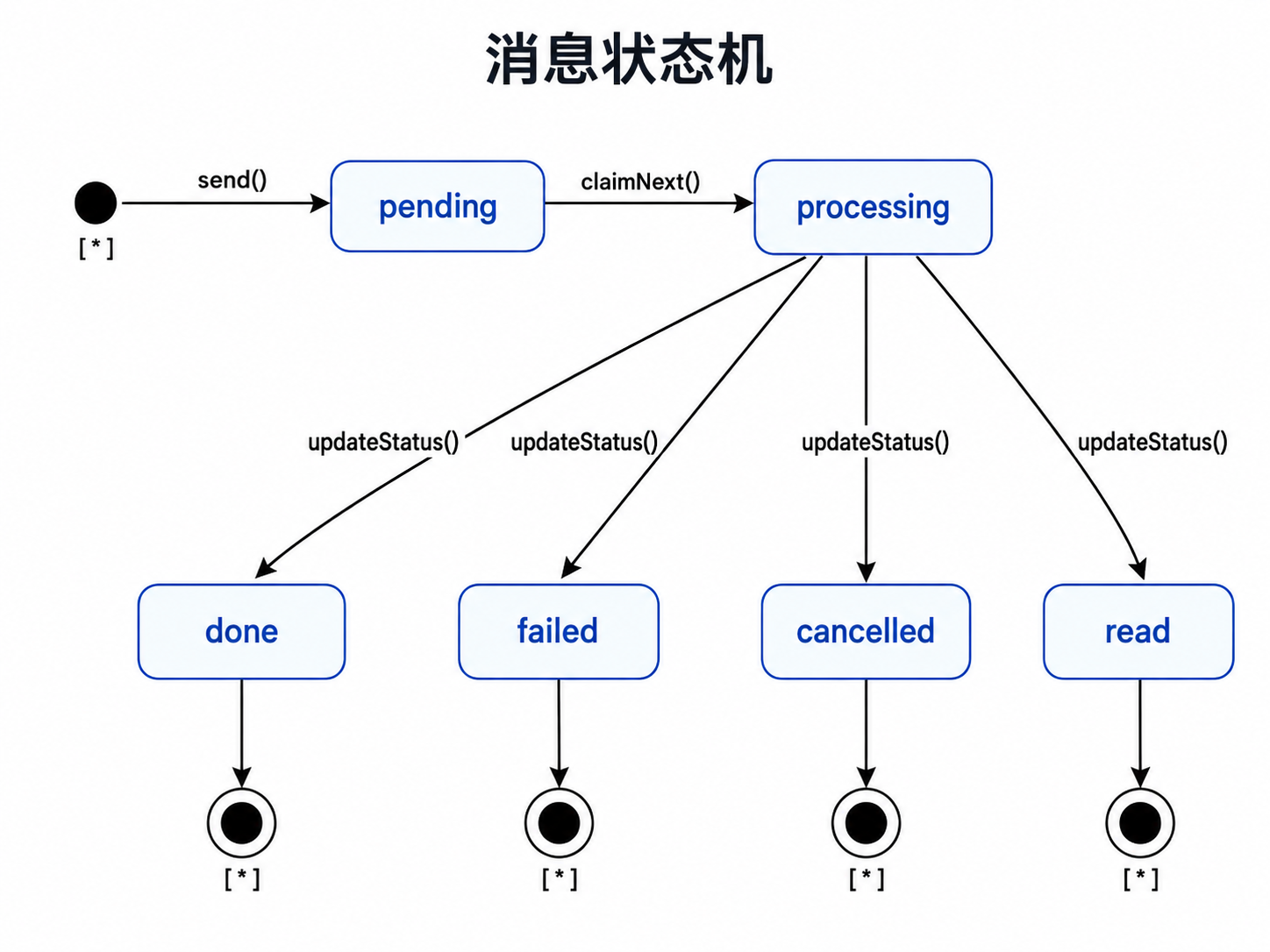
不必被这一堆状态吓到:状态流转由 team runtime 驱动,你的 adapter 只负责存取。消息的状态机:
一次 handoff 的实际流程:
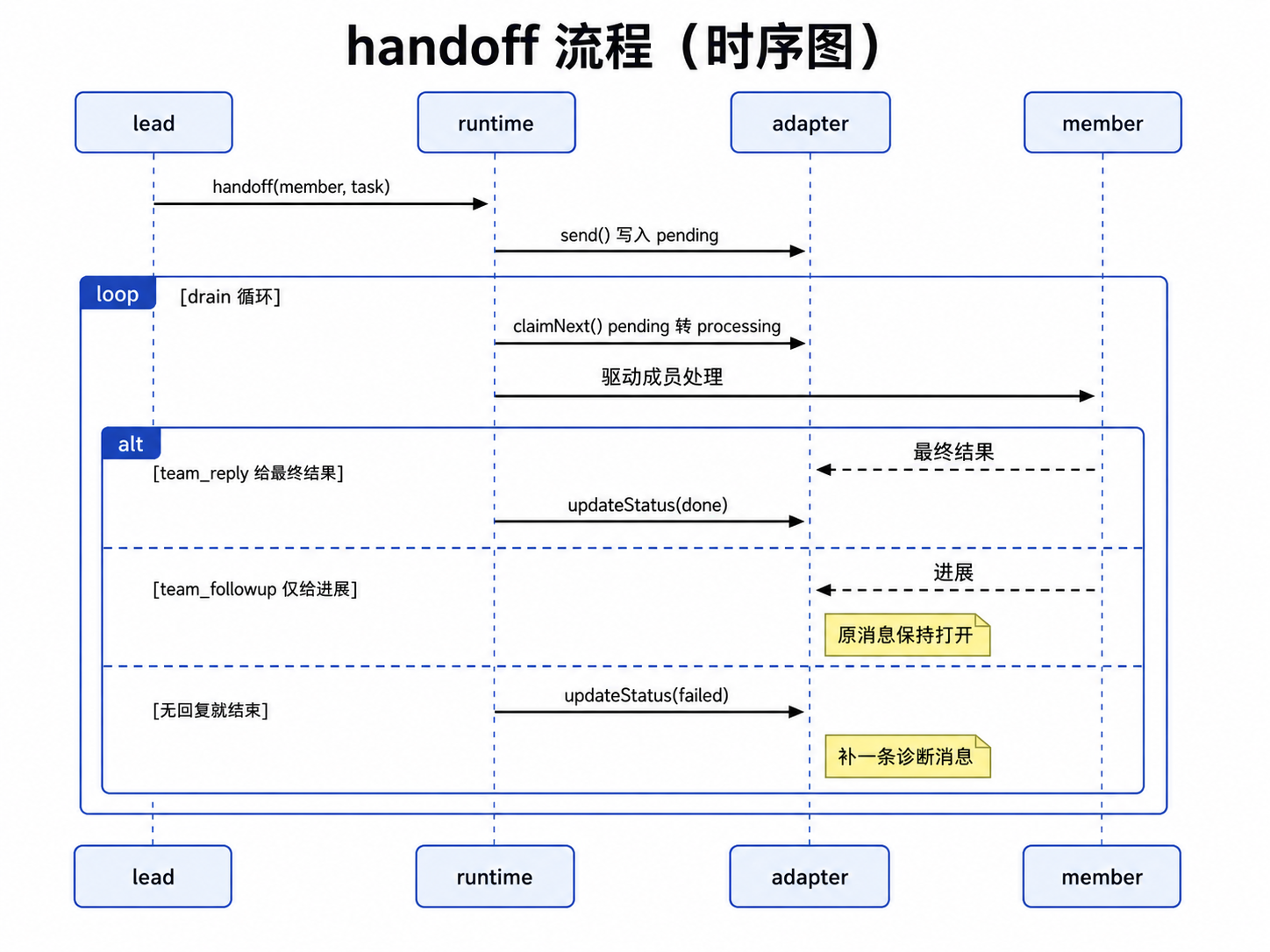
只报进展用
team_followup(原消息不关闭);member 无回复就结束 →failed并补一条诊断消息。
你要实现的,就是支撑这套流程的 5 个存储方法。下面是一个最小、可运行的内存实现(逻辑都在);换成 Redis / D1 / Durable Objects 时,把存储调用换掉、并让 claimNext 在并发下原子化即可:
import type { TeamMailbox, TeamMessage } from "agent-lattice";
const byId = new Map<string, TeamMessage>();const order: string[] = [];   // 按 send 顺序记录 id,用于 FIFO 领取let seq = 0;
const myMailbox: TeamMailbox = {  async send(from, to, content, options = {}) {    const id = `msg_${++seq}`;    const msg: TeamMessage = {      id, from, to, content,      status: "pending",      createdAt: Date.now(),      threadId: options.threadId ?? id,      ...options,    };    byId.set(id, msg);    order.push(id);    return { ...msg };  },  async inbox(mailboxId, options = {}) {    const status = options.status ?? "pending";    return order      .map(id => byId.get(id)!)      .filter(m => m.to === mailboxId && (status === "all" || m.status === status))      .map(m => ({ ...m }));  },  async get(messageId) {    const m = byId.get(messageId);    return m ? { ...m } : undefined;  },  async claimNext(mailboxId) {    for (const id of order) {      const m = byId.get(id);      if (m && m.to === mailboxId && m.status === "pending") {        m.status = "processing";   // 单进程下安全;分布式后端要用 Lua/事务保证原子        return { ...m };      }    }    return undefined;  },  async updateStatus(messageId, status) {    const m = byId.get(messageId);    if (!m) return false;    m.status = status;    return true;  },};
const team = createTeam({ /* name、lead、members 等 */ mailbox: myMailbox });
SDK 内置的
createMemoryMailbox()就是这种实现的成品版,开箱即用;上面这版只是把它简化出来,方便你照着改成自己的后端。
两个关键点:claimNext 在分布式后端必须原子(多个成员可能并发领同一 mailbox),它把消息从 pending 翻成 processing;updateStatus 负责把消息推到终态(done / failed / cancelled / read),runtime 靠它推进 handoff。
因为 teamMember().agent 接受任意 AgentLike,一个 team wrapper 可以成为另一个 team wrapper 的成员。
const engineeringTeam = createTeam({  name: "engineering",  lead: engineeringHeadAgent,  members: [    teamMember({ name: "backend", role: "executor", agent: backendAgent }),    teamMember({ name: "frontend", role: "executor", agent: frontendAgent }),  ],});
const companyTeam = createTeam({  name: "company",  lead: ceoAgent,  members: [    teamMember({      name: "engineering",      role: "head",      focus: "Own engineering delivery",      agent: engineeringTeam,    }),  ],});
CEO 看到的是一个 engineeringTeam 成员。这个成员内部仍然是一个可调用的 wrapper(调用它就等于和工程负责人对话),工程负责人可以继续把工作路由给 backend 或 frontend。
手动 drain
Section titled “手动 drain”team.prompt() 和 team.query() 是默认路径。它们会驱动已接收的 handoff,直到 root lead 返回最终结果。
只有在需要显式接管路由、持久化或 worker loop 时,才使用底层 mailbox 控制:
const message = await team.mailbox.claimNext("engineering::researcher");
const result = await team.drain({  maxRounds: 5,  maxMessages: 20,});
drain() 会遍历团队成员,从每个成员自己的 mailbox 里领取消息,然后提示该成员 agent 处理。它不会重新判断“这个任务该给谁”,也不会改路由。
成员处理完必须调用 team_reply 返回最终结果,或调用 team_followup 回复阶段性进展。如果成员 agent 结束时两者都没有调用,runtime 会把原消息标记为 failed,并向上级 mailbox 发送一条诊断性 follow-up。